Claude Code Skills vs. MCP Servers: What Marketers Need to Know
If you have been building with Claude Code for any amount of time, you have probably heard two terms thrown around: skills and MCP servers. If you are a marketer, neither term is immediately intuitive. And the explanations you find online are written for developers, which makes them useless for the people who would benefit from them most.
Here is the plain English version.
What a skill is
A skill is an instruction file that teaches Claude Code how to do a specific job. It lives in your project as a markdown file. When you run it, Claude Code reads the instructions and executes the workflow you described.
Every agent I have built is a skill. The competitive ads scanner is a skill. The content repurposing engine is a skill. The strategy audit is a skill. Each one is a markdown file in the .claude/commands/ folder with a set of instructions that describe inputs, process, output format, and rules.
When you type /competitive-ads in Claude Code, it reads that skill file and knows exactly what to do. Scan these platforms. Extract these data points. Format the output this way. Check against these rules.
Skills are the agents you build. They are the core of your marketing operating system.
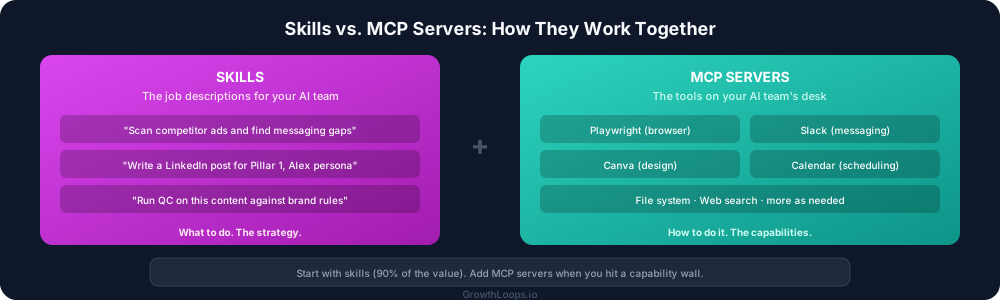
Think of skills as: job descriptions for your AI team members. Each one describes a role, what the role does, and how it should do it.
What an MCP server is
MCP stands for Model Context Protocol. An MCP server is a bridge that connects Claude Code to an external tool or service.
By default, Claude Code can read files, write files, search the web, and run commands on your computer. But it cannot open a browser, connect to your CRM, pull data from an API, or interact with platforms like Canva, Slack, or Google Calendar.
An MCP server gives it those capabilities.
The Playwright MCP server lets Claude Code open a web browser, navigate to websites, click buttons, fill forms, and take screenshots. This is how the competitive ads agent scans Meta Ad Library and LinkedIn Ad Library. It literally opens the pages and reads them.
A Slack MCP server lets Claude Code read and send messages in Slack channels. A Google Calendar MCP server lets it check your schedule and create events. A Canva MCP server lets it create and edit designs.
Think of MCP servers as: tools on your AI team member's desk. The skill tells them what job to do. The MCP server gives them the tools to do it.
How they work together
Here is a real example from my own system.
My competitive ads intelligence skill says: "Open Meta Ad Library, search for these competitors, extract the ad creative, take screenshots, and save everything to an output folder."
The skill describes the job. But Claude Code cannot open a web browser by itself. It needs the Playwright MCP server to do that.
So when the skill runs:
- Claude Code reads the skill instructions (what to do)
- Claude Code uses the Playwright MCP server (how to do it)
- The browser opens, navigates to Meta Ad Library, extracts the data
- Claude Code processes the results according to the skill instructions
- The output is formatted and saved
The skill is the strategy. The MCP server is the execution capability.
Which MCP servers matter for marketing teams
You do not need dozens of MCP servers. Most marketing workflows need two or three.
Playwright (browser automation). This is the most useful MCP server for marketers. It lets Claude Code interact with any website. Competitive research, ad library scanning, website auditing, form testing. Any workflow that requires visiting a website.
File system tools. Claude Code can already read and write files, but understanding that it can create folders, organize outputs, and manage your project structure is important for building workflows that produce organized deliverables.
Platform-specific servers. If your workflow requires interacting with Slack, Google Calendar, Canva, or other platforms, there are MCP servers for those. You add them as needed. Most people do not need them to start.
The practical takeaway
When you are building your marketing operating system, think about it this way:
Skills are what you build first. Every workflow, every agent, every repeatable process is a skill. You can build dozens of skills without ever thinking about MCP servers.
MCP servers are what you add when a skill needs a capability Claude Code does not have by default. Your skill says "scan competitor ads." You add the Playwright MCP server because that job requires a browser.
Start with skills. They are the 90% of the value. Add MCP servers when you hit a capability wall. Most marketers will get months of value from skills alone before they need their first MCP server.
Why this matters for go-to-market teams
Understanding the difference between skills and MCP servers is the difference between building agents that work within Claude Code and building agents that work across your entire tool stack.
A marketing operating system that only reads and writes files is useful. A marketing operating system that also browses competitor websites, pulls data from your CRM, posts to your social channels, and creates designs in Canva is transformative.
Skills define the strategy. MCP servers extend the reach. Together, they turn Claude Code from a writing assistant into a go-to-market execution platform.