How to Connect Claude Code to Your Existing Marketing Stack
You have a marketing stack. HubSpot or Salesforce for CRM. Google Analytics for web data. LinkedIn and Meta for advertising. Slack for communication. Maybe Canva for design. Maybe Google Calendar for scheduling.
The question every marketing team asks when they start building AI agents is: can Claude Code talk to all of this?
The answer is yes. Not through some enterprise integration platform. Through MCP servers that connect Claude Code to external tools one at a time.
Here is how the connections work and which ones matter most for go-to-market teams.
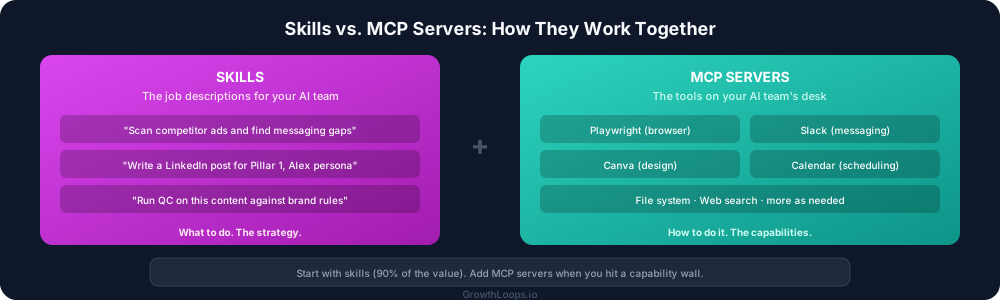
How connections work
Claude Code is powerful on its own. It can read and write files, search the web, and run commands on your computer. But it cannot log into HubSpot, open a browser, check your calendar, or send a Slack message by default.
MCP servers add those capabilities. Each MCP server is a bridge to a specific tool or category of tools. You add the ones you need. They become available to every agent in your system.
When an agent needs to scan a competitor's ad library, it uses the browser MCP server (Playwright) to navigate to the ad platform. When an agent needs to post a content update, it uses the Slack MCP server. When it needs to create a graphic, it uses the Canva MCP server.
The key insight: you do not need to connect everything at once. Start with the connections that unlock the workflows you care about most.
The connections that matter most
Tier 1: Browser automation (Playwright). This is the most impactful connection for marketing teams. It lets Claude Code open any website, navigate pages, click buttons, fill forms, take screenshots, and extract information.
Use cases: Competitive ad scanning across Meta, LinkedIn, and Google ad libraries. Website auditing. Content research. Any workflow that involves looking at a web page.
Tier 2: Communication (Slack). Connecting Slack lets agents read channel messages, send updates, and share outputs with your team. This is how agent outputs get distributed without you manually copying and pasting.
Use cases: The competitive intelligence agent sends a weekly summary to the marketing Slack channel. The QC agent flags a content issue directly to the author. The orchestrator posts a completion summary when a workflow finishes.
Tier 3: Calendar and scheduling (Google Calendar). Connecting your calendar lets agents check availability, find meeting times, and coordinate scheduling.
Use cases: The meeting prep agent checks your calendar, sees who you are meeting with, and generates a prep brief automatically before the meeting. The content calendar agent blocks time for content production based on your publishing schedule.
Tier 4: Design (Canva). Connecting Canva lets agents create, edit, and export designs programmatically.
Use cases: The visual marketing agent generates a creative brief and then creates the actual design in Canva. Social media graphics get produced alongside the content, not as a separate step.
How to set up a connection
Each MCP server has its own setup process, but the pattern is the same:
- Install the MCP server (usually a one-line command)
- Authenticate with the external service (log in, provide an API key)
- The capabilities become available to all your agents
The setup for most MCP servers takes five to ten minutes. You do it once. Every agent can use the connection from that point forward.
The integration mindset
The real power is not in any single connection. It is in how the connections combine.
A workflow without integrations: You run the competitive ads agent. It searches the web for competitor information. You read the output. You manually share it with your team. You manually create content in response.
A workflow with integrations: You run the competitive ads agent. It uses Playwright to scan live ad libraries and take screenshots. The output feeds into the content agent, which drafts a response blog post. The blog post feeds into the repurposing engine, which generates LinkedIn posts. The LinkedIn posts get shared to Slack for team review. The visual agent creates graphics in Canva to accompany the posts.
Same workflow. Same agents. But the integrations remove every manual handoff. The output flows through the system without you copying, pasting, or switching tools.
Start small, connect as you go
Do not try to connect your entire marketing stack on day one. That is the enterprise integration trap: spend three months connecting everything before you produce any value.
Instead:
Month 1: Build agents that work with files and web search. No MCP servers needed. This is where 80% of the value lives.
Month 2: Add Playwright for browser automation. This unlocks competitive intelligence, website auditing, and any workflow that requires visiting a web page.
Month 3: Add communication connections (Slack) so agent outputs get distributed to your team automatically.
Month 4 and beyond: Add connections as specific workflows demand them. Canva for design automation. Calendar for meeting prep. CRM for pipeline data.
Each connection is additive. The system you built in Month 1 keeps working. Each new connection makes it more powerful.
The end state
A fully connected marketing operating system looks like this: AI agents that research competitors in real time, produce content in your brand voice, quality-check everything against your rules, create visual assets, distribute to your team via Slack, and publish to your website. All triggered by plain English instructions through the orchestrator.
That is not a vision for the future. That is what I run today. And it started with a single agent that read and wrote files.
Start there. The connections will follow naturally as your system grows and your workflows demand them.