The Visual Marketing Agent: Creative Briefs in Seconds, Not Days
Visual assets are the bottleneck in every marketing operation I have ever run. The copy is done. The campaign strategy is set. The targeting is dialed. And then everything stops because we need a LinkedIn ad graphic, a webinar thumbnail, an email header, and three social media images. The designer is booked for two weeks. Or we do not have a designer and someone on the marketing team is spending four hours in Canva trying to make something that does not look terrible.
I lived this at every company I worked at. At Holistaplan, we were producing over 70 webinars a year. Each one needed promotional graphics across multiple platforms. At ApexEdge, we were running constant A/B tests on ad creative. The creative production was always the constraint, never the strategy.
So I built an AI agent that generates complete creative briefs and ready-to-paste prompts for AI design tools in seconds. Not the final asset. The thinking and direction that makes the final asset good.
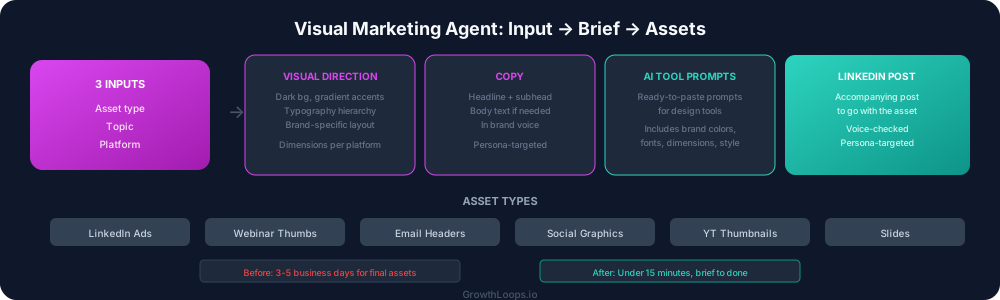
What the visual marketing agent does
You give the agent three inputs: the asset type you need, the topic, and the platform it is for.
The agent generates a complete creative brief that includes:
Visual direction. What the asset should look like. Not vague descriptions like "modern and clean." Specific direction: dark background with gradient accents, premium minimal aesthetic, bold typography for the headline, supporting data visualization element. The brief follows the GrowthLoops brand system: dark backgrounds, fuchsia and teal gradient accents, Inter font family, minimal layout with strong typography hierarchy.
Copy. The headline, subheadline, and any body text the asset needs. Written in brand voice, targeted to the specific persona, mapped to the relevant messaging pillar. The copy is ready to place, not a starting point that needs rewriting.
AI tool prompts. This is the part that saves the most time. The agent generates ready-to-paste prompts for AI design tools like Nano Banana, Genspark, and Higgsfield. Each prompt is formatted for the specific tool and includes the visual direction, dimensions, style notes, and brand elements. You paste the prompt, generate the asset, and you are done.
LinkedIn post. Every visual asset needs a post to accompany it. The agent writes the LinkedIn post that goes with the graphic, following all the brand voice rules and persona targeting.
The asset types it handles
The agent generates briefs for the visual assets that B2B SaaS marketing teams need most:
LinkedIn ad graphics. Single image ads with headline, value proposition, and CTA. The agent knows LinkedIn's image specs and designs the brief for maximum scroll-stopping impact within the constraints of the format.
Webinar thumbnails. Promotional graphics for webinars that include the title, speaker name, date, and a visual hook. After producing graphics for 70+ webinars, I encoded every lesson about what makes a webinar thumbnail convert into the agent's instructions.
Email headers. Banner graphics for email campaigns that reinforce the subject line and drive the reader into the body copy. Sized for standard email clients with fallback considerations.
Social media graphics. Platform-specific dimensions and design approaches for LinkedIn, Twitter, and Instagram. Each platform has different visual conventions and the agent adjusts accordingly.
YouTube thumbnails. Text overlay options, expression direction for speaker photos, and the contrast patterns that drive click-through on YouTube.
Presentation slides. Key slides for pitch decks or webinar presentations with data visualization suggestions, layout structure, and copy.
Why the brief matters more than the tool
The AI design tools are getting better every month. The limiting factor is not the tool. It is the input. A bad prompt generates a bad asset regardless of how good the tool is.
Most marketers open an AI design tool and type something like "create a professional LinkedIn ad about B2B marketing." The result looks like clip art with a gradient. It is technically an image. It is not a marketing asset.
The visual marketing agent solves the input problem. It generates prompts that are specific enough to produce assets that look like they came from a design team, not a random generator. The prompts include brand colors, typography, layout structure, visual hierarchy, and copy placement. The AI tool has enough direction to produce something you would actually use.
How it fits into the workflow
The visual marketing agent is most powerful when it is chained with the other agents in the system.
Write a blog post. Run it through the content repurposing engine to generate LinkedIn posts, email copy, and ad copy. Then run the visual agent to generate the creative briefs and design tool prompts for every asset you need to support those content pieces.
One blog post becomes 24 pieces of written content and a full set of visual assets to support them. The entire pipeline, from blog draft to published content with graphics, runs in an afternoon.
That is what marketing operations looks like when you stop treating each asset as a standalone project and start treating content production as an integrated system.
The time math
Before this agent, a typical campaign asset package looked like this: two days for the designer to produce the initial concepts, a round of revisions, final delivery three to five business days later. If the designer was busy, add a week.
With the visual agent, the creative brief and AI tool prompts are ready in under a minute. Generating the actual assets in the AI design tools takes another five to ten minutes. Total time from "we need graphics" to "graphics are done": under 15 minutes.
That speed changes what is possible. You can A/B test more creative variations. You can produce platform-specific assets instead of resizing one graphic for everything. You can respond to competitive moves with new creative in hours instead of weeks.
The constraint is no longer production. The constraint is strategy. And that is exactly where a marketing team's time should be spent.