Why Every Go-to-Market Team Should Have a GitHub Account
This is going to sound strange to most marketing teams. GitHub is where developers store code. What does a marketing team need with a code repository?
Everything. And I mean that literally.
GitHub is not just for code. It is a version-controlled system for managing any collection of files. And once your marketing team starts building AI agents, brand bibles, content pipelines, and dashboards, you need a place to store them, track changes, collaborate, and deploy.
I use GitHub to manage my entire marketing operating system. Every agent skill file, every blog post, every brand bible update, every diagram. It all lives in a GitHub repository. Changes are tracked. Nothing gets lost. And when I push an update, my website deploys automatically.
Here is why your go-to-market team should do the same.
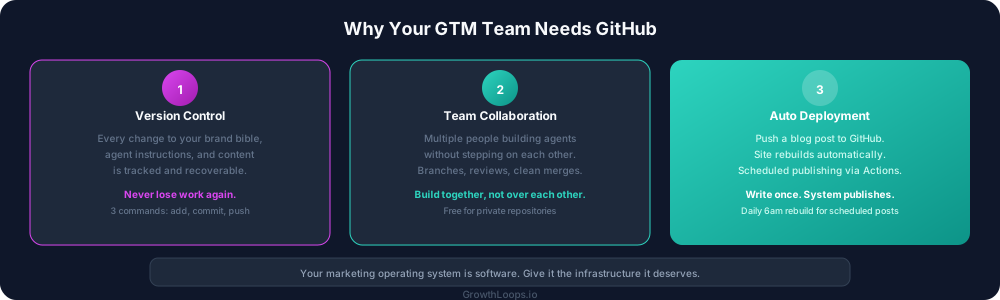
Version control for your marketing brain
Your brand bible is a living document. The personas get refined. The voice rules get tightened. The banned words list grows. The competitive positioning shifts.
Without version control, those changes happen in a Google Doc that someone edits and you never know what changed, when, or why. The "latest version" is whatever someone saved last. If a change breaks something, you cannot go back.
With GitHub, every change is a commit. You can see exactly what changed, when it changed, and who changed it. If a voice rule update makes the content agent produce worse output, you roll back to the version that worked. Try doing that in Google Docs.
This alone is worth the setup time. Your brand bible, your agent instructions, your content templates. All version-controlled. All recoverable. All auditable.
Collaboration without chaos
When multiple people on your team are building agents, you need a way to manage contributions without stepping on each other's work.
GitHub handles this natively. Each person can work on their own branch. Changes get reviewed before they merge into the main system. If two people edit the same agent instructions, GitHub flags the conflict instead of silently overwriting one person's work.
For a marketing team building a shared operating system, this is essential. The demand gen person is refining the competitive ads agent. The content lead is updating the blog writer. The GTM engineer is building a new dashboard. All happening simultaneously. All managed cleanly.
Deployment automation
This is the piece that ties everything together.
My blog posts are markdown files in a GitHub repository. When I push a new post, my website rebuilds and deploys automatically. The static HTML gets generated. The structured data gets baked in. The post goes live. Zero manual deployment steps.
That automation is powered by GitHub. The repository is connected to my hosting platform. Every push triggers a build. The build runs the pre-rendering script. The site updates.
I also have a GitHub Action that runs every morning at 6am. It triggers a rebuild that publishes any scheduled blog posts whose date has arrived. I write posts in batches, set future dates, and the system handles the rest.
None of this is possible without a repository that connects to your deployment pipeline. GitHub is that repository.
Your marketing operating system deserves infrastructure
Here is the mindset shift.
Your marketing operating system is software. It has components (agents, skills, brand context). It has dependencies (this agent reads that brand bible). It has versions (the current instructions versus last month's instructions). It has deployments (pushing a new blog post to your live website).
Software needs infrastructure. Infrastructure means version control, collaboration tools, and deployment pipelines. GitHub provides all three.
You would never run a software product without version control. Your marketing operating system is a software product. Treat it like one.
How to get started
Step 1: Create a GitHub account. Free. Takes two minutes.
Step 2: Create a private repository. This is where your marketing operating system lives. Your CLAUDE.md brand bible, your agent skill files in .claude/commands/, your content, your templates.
Step 3: Learn three commands. That is all you need to start. git add stages your changes. git commit saves them with a description. git push sends them to GitHub. Claude Code can run these for you, so you do not even need to memorize them.
Step 4: Connect your deployment. If you have a website, connect the repository to your hosting platform so changes deploy automatically. If you do not have a website yet, skip this step. The version control and collaboration benefits stand on their own.
The security note
One critical rule: always confirm whether a repository should be public or private before creating it. Your brand bible, your client data, your internal agent instructions. These should be private. Your open-source tools that you want others to use can be public.
The default should be private. Make it public only when you have a specific reason.
What this looks like in practice
My setup has multiple repositories:
A private repository for my marketing agents and brand bible. This is the core operating system. All agent skills, all brand context, all internal tools. Private. Version-controlled. Continuously updated.
A private repository for my website and blog. All blog posts, all diagrams, all site code. Connected to my hosting for automatic deployment. Scheduled publishing via GitHub Actions.
A public repository for the open-source skills. The competitive ads agent, the strategy audit, the content repurposing engine. Public. Anyone can clone and use them. They serve as proof points for what the system can do.
Each repository has a clear purpose. Each one is managed with the same version control discipline that engineering teams use for their products.
Your marketing operating system is your product. Give it the infrastructure it deserves.