Your First AI Agent: A Step-by-Step Guide for Marketers
This is the post I wish someone had written for me six months ago. Not a theoretical overview of AI in marketing. Not a list of tools to try. A literal step-by-step guide for building your first AI agent as a marketer with zero technical background.
I am going to walk you through the entire process. By the end, you will have a working AI agent that handles one of your most time-consuming tasks. It will take about two hours. And it will fundamentally change how you think about every repetitive task in your workflow.
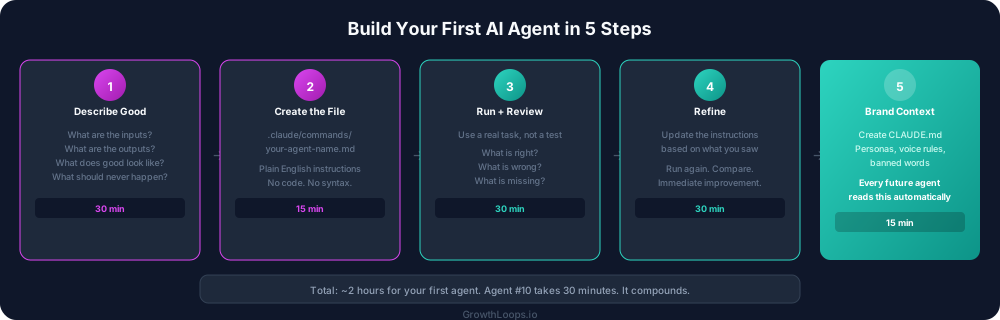
Before you start: pick your task
Do not start with the most ambitious idea you have. Start with the most painful repetitive task.
Ask yourself: what do I spend time on every week that follows the same pattern? Where is the gap between time spent and strategic value the widest?
Good first agents:
- Competitive research summaries
- Content reformatting (blog to LinkedIn, email to social)
- Weekly performance report compilation
- Meeting prep briefs
- First-draft content in your brand voice
Bad first agents:
- "Build me an entire marketing strategy"
- "Replace my content team"
- Anything where you cannot clearly describe what good output looks like
The rule is simple: if you can explain the task to a smart new hire in 15 minutes, you can build an agent for it.
Step 1: Describe what good looks like (30 minutes)
Before you open Claude Code, open a blank document. Write down exactly what the perfect version of this task looks like.
Inputs: What information does the task need to start? A company name? A topic? A piece of existing content?
Process: What steps does the task follow? Be specific. "Research the company" is not specific enough. "Find the company's ARR range, primary product, target market, recent funding, and top three competitors" is specific.
Output: What should the final deliverable look like? Describe the format, the length, the sections, the tone. If you have an example of a great output from when you did this task manually, reference it.
Rules: What should never happen? What words should never appear? What quality standards must be met?
This document is your agent's instruction set. The more specific you are, the better the agent performs on its first run.
Step 2: Create the command file (15 minutes)
Open Claude Code in your project directory. Create a file at .claude/commands/your-agent-name.md.
This file is where your instruction set lives. Paste in everything you wrote in Step 1, organized as a clear set of instructions. Use headers to separate sections. Use bullet points for lists. Be direct.
Here is the structure:
# Agent Name

## What this agent does
One sentence describing the job.

## Inputs
What the user provides when they run this agent.

## Process
Step-by-step instructions for what the agent should do.

## Output format
Exactly what the deliverable should look like.

## Rules
What to always do. What to never do. Quality standards.
That is it. No code. No special syntax. Just clear instructions in plain English.
Step 3: Run it and review (30 minutes)
In Claude Code, run your agent with a real input. Not a test case. A real task you actually need done.
The first output will not be perfect. That is expected and fine. What you are looking for:
What is right? Which parts of the output match what you would have produced manually? Note these. They tell you which instructions are working.
What is wrong? Which parts miss the mark? Be specific. "The tone is off" is not helpful. "The second paragraph sounds like a textbook instead of a practitioner" is helpful.
What is missing? What did you expect to see that is not there? These are instructions you need to add.
Step 4: Refine the instructions (30 minutes)
Go back to your command file and update the instructions based on what you saw.
If the tone was wrong, add specific voice guidelines. "Write like a practitioner sharing lessons from experience, not an academic explaining theory. Use short declarative sentences. Lead with the insight, not the setup."
If the output was too long, add length constraints. "The summary should be 300 to 500 words maximum. Three sections: key findings, implications, and recommended actions."
If it missed important context, add it. "Always check the company's recent blog posts for messaging themes. Always note if they have recently changed their pricing page."
Run the agent again with the same input. Compare the outputs. You will see immediate improvement.
Step 5: Add your brand context (15 minutes)
Once the agent is producing good output for the task itself, create a CLAUDE.md file in your project root. This is your brand bible. Start with the basics:
Who you are. Company name, what you do, who you serve.
Your personas. Two to four buyer personas with their title, pain points, and what they care about.
Your voice rules. Three to five rules that define how your brand sounds. Direct or conversational? Data-driven or story-driven? What words do you never use?
Every agent you build from this point forward reads this file automatically. Your competitive research agent, your content agent, your email agent. They all sound like your brand because they all read the same context.
What happens next
You now have a working AI agent and a brand context file. You are a go-to-market engineer.
The second agent is easier because the pattern is established. Pick the next painful task. Write the instructions. Run it. Refine it. The brand context is already in place so the output starts on-brand from the first run.
By agent three or four, you will start connecting them. The competitive research agent's output feeds into the content agent. The content agent's output runs through a QC check. You are building a system, not a collection of tools.
The first agent takes two hours because everything is new. The tenth agent takes 30 minutes because the pattern is second nature and the brand context is already refined.
Start today. Pick the task. Describe what good looks like. Build the agent. The two hours you spend now will save you hundreds of hours over the next year.