Your Vibe-Coded Website Looks Great. AI Can't Read a Single Word of It.
I built my website with a vibe coding tool. It looked beautiful. Clean design, smooth animations, responsive on every device. I was proud of it.
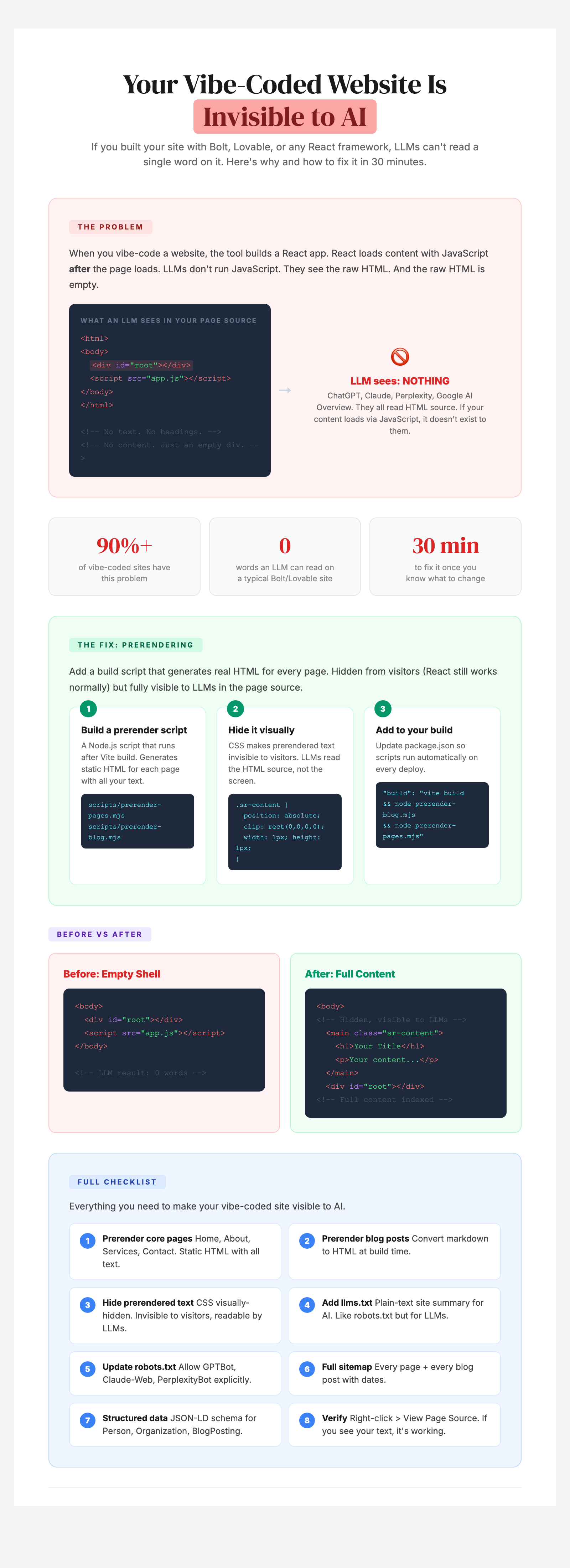
Then I checked View Page Source. This is what every LLM in the world sees when it visits my site: an empty page. No text. No headings. No content. Just an empty container and a JavaScript file.
Twenty-two blog posts. Eight core pages. Thousands of words of content. Case studies, frameworks, workshops, testimonials. All invisible to AI.
Here is everything you need to know about the problem and how to fix it.
The Vibe Coding Problem Nobody Talks About
Vibe coding tools are incredible for building fast. You describe what you want, the AI generates a working website, and you deploy it in an afternoon. For a human visitor, it works perfectly.
The problem is that these tools build websites that load content with JavaScript. The text, the headings, the images, everything you see on the page only appears after the browser runs a program. Before that program runs, the page is empty.
LLMs don't run that program. They read the raw page. And the raw page is blank.
ChatGPT, Claude, Gemini, Perplexity, Google's AI Overview. When they visit your website, they read the source code. If your content only loads after JavaScript runs, your site is a blank page to every AI in the world.
90%+ of websites built with Bolt, Lovable, Replit, or v0 have this problem.
What's Actually Invisible
This isn't just a blog problem. If your site is built this way, AI can't see:
- Your homepage positioning and value proposition
- Your services and pricing pages
- Your blog posts and thought leadership
- Your case studies (even if they're ungated)
- Your about page and founder story
- Your testimonials and social proof
Your SEO might be fine because Google eventually processes JavaScript. Your AEO (AI Engine Optimization) is zero because LLMs don't.
How to Check If Your Site Has This Problem
This takes 30 seconds.
- Open your website in Chrome
- Right-click anywhere and click "View Page Source" (not Inspect Element. View Source.)
- Search for any text from your homepage. Your tagline, a heading, anything.
- If you see your content in the source, you're fine
- If all you see is a blank page with a script reference, AI can't read your site
How I Fixed It
When I discovered this, I had 22 blog posts and 8 core pages that were completely invisible to AI. Here is the approach.
The concept is simple: Generate a real HTML version of every page that contains all your text. Hide that text from visitors (they see the normal pretty website) but keep it visible in the page source for LLMs to read.
There are three parts to the fix:
1. Build a prerender script. A small program that runs every time your site deploys. It takes all your content and generates real HTML pages with your actual text baked in. No JavaScript required to read it.
2. Hide the text visually. The prerendered text is in the page source (LLMs can read it) but invisible on screen (visitors see the normal site). This uses the same technique that screen readers use. The content exists but takes up zero visual space.
3. Add it to your build process. The script runs automatically on every deploy. You never have to think about it again.
What Else You Should Add
Beyond prerendering, there are a few more things that make your site visible to AI:
- llms.txt is a plain-text file at your site root that tells LLMs what your site is about. Think of it as a cheat sheet for AI.
- robots.txt should explicitly allow AI crawlers like GPTBot, Claude-Web, and PerplexityBot. Most sites only mention Google.
- A complete sitemap that includes every page and every blog post with dates. Not just your homepage.
- Structured data that tells LLMs who you are, what your business does, and what each page is about.
The Full Checklist
- Prerender core pages (Home, About, Services, Contact)
- Prerender blog posts (convert to real HTML at build time)
- Hide prerendered text (invisible to visitors, readable by LLMs)
- Add llms.txt (plain-text site summary for AI)
- Update robots.txt (allow AI crawlers explicitly)
- Generate a full sitemap (every page + every blog post)
- Add structured data (helps LLMs understand context)
- Verify with View Page Source (if you see your text, it's working)
The Before and After
Before: Every page on my site returned a blank page to LLMs. Zero words readable. Twenty-two blog posts completely invisible to AI discovery.
After: Full text content in the HTML source of every page. Blog posts with complete articles and proper metadata. LLMs can read every word.
I verified this by asking Claude to summarize my blog post. Before the fix, it couldn't. After the fix, it returned the full article.
Why This Matters Right Now
Every week, thousands of founders and marketing teams are building websites with vibe coding tools. Most of them have no idea the output is invisible to AI. They're creating great content, publishing it to a beautiful site, and wondering why they never show up in AI recommendations.
The fix takes about 30 minutes once you know what to change. But you have to know the problem exists first.
Check your site today. Right-click. View Page Source. If you see your content, you're fine. If you see a blank page with a script tag, you have work to do.